Getting Started
Basic usage requires no configuration except selecting a folder to share. The server starts on your machine's IP address and port 8080. You can access it from any device on the same network by typing the server's URL in a web browser.
- Share files between devices on your local network
- Test/prototype web applications
- Access files on a phone, tablet, or computer from another device
- Simple file management through a web interface
Basic usage
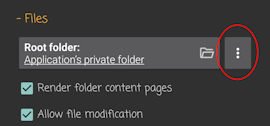
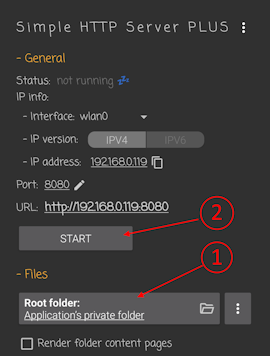
Select the folder you want to share and press the start button. The server will bind to your machine's IP and the default port.
Sharing URL
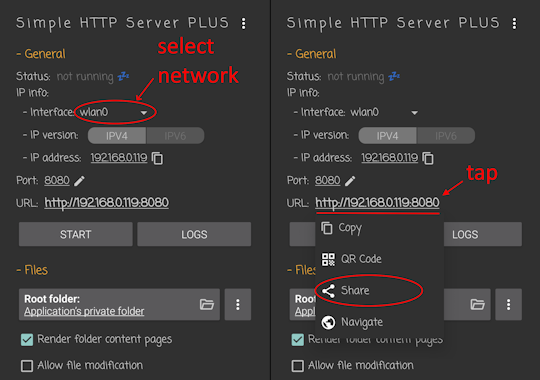
After the server is running, use the sharing panel to get the URL for other devices.
- Network interface — Choose the right interface from the list (e.g. Wi‑Fi vs mobile data) so the URL works for clients on the same network.
- IP version — IPv4 or IPv6, depending on your network.
- Share options — Copy full URL, system share (messaging, email, etc.), show QR code, or open in browser. You can also copy only the IP address.
Network interface selection
On Android, Wi‑Fi interfaces are usually named wlan0 (sometimes wlan1 if multiple are present). That is typically the one to use when both the server and the clients are on the same Wi‑Fi. Mobile (cellular) interfaces can have names like rmnet or ccmni and come with important limits: carriers often use CGNAT (Carrier-Grade NAT), so the device gets a private IPv4 address that is not reachable from the internet or from other mobile subscribers. Direct access from another device on mobile data is usually not possible over IPv4. IPv6 may work when both sides have native IPv6 and no firewall blocks it, but support and reachability vary by carrier and network. On desktop, choose the LAN or Wi‑Fi adapter that is on the same network as your clients.
For sharing on a home or office LAN, prefer the Wi‑Fi interface and ensure the client is on the same network. Use mobile interfaces only when you understand the network (e.g. tethering) and accept the restrictions.
Render folder content pages
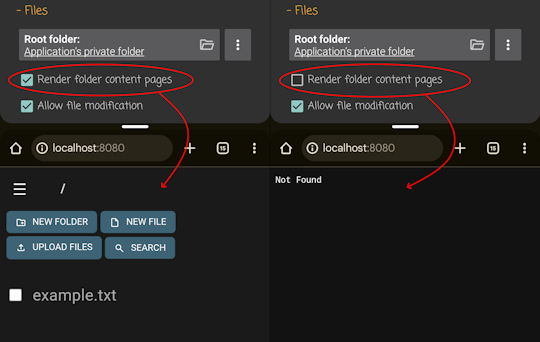
This option is enabled by default. When on, the server generates web pages with a user interface for file listings (and for file operations if allow file modification is enabled).
When this option is off, the server does not generate folder listing pages. The logic for handling a URL that points to a directory (e.g. looking for index.html there, or returning 404 if not found) is not dependent on this option and is controlled entirely by redirect settings—see the relevant section of the documentation.
Allowing file modification
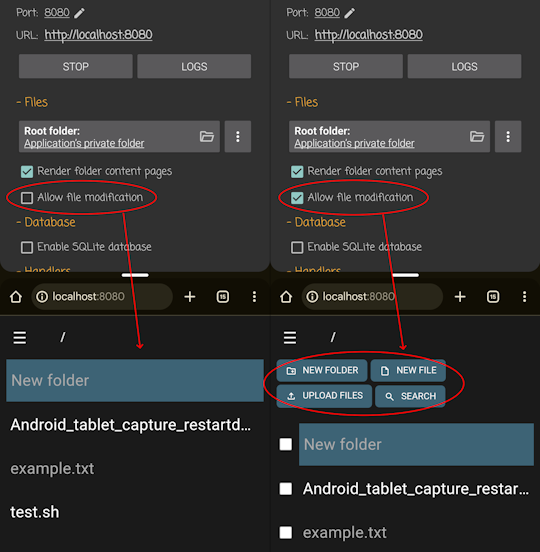
By default the server serves files read-only. Enable the “allow file modification” option (checkbox) if you want to change files from the web interface. When enabled, the web UI supports:
- Upload — Upload button and drag-and-drop
- Delete — Remove files and folders
- Copy / move — Copy or move items
- New file / directory — Create files and folders
- Edit in web text editor — Edit text files in the browser
- Download as ZIP — Download a folder as an archive
File access variants (Android only)
On Android you can choose how the app accesses the selected folder. This affects performance and which features are available.
- File API (default, recommended) — Full access and best performance. All features work, including advanced ones like CGI.
- Storage Access Framework (SAF) — More secure and works with app-specific and shared storage, but slower and with some limits (e.g. some advanced features like CGI may not work).
- Media Store — More limited than SAF; mainly for media. On some devices (e.g. some Android TV-based setups) it can be the only option that works.